Introduction
Mobile devices now dominate how people access the internet. As of April 2026, 53.78% of global internet traffic comes from mobile devices — with India pushing even higher at 68.89%.
With over 622 million smartphone owners in India and 94% of internet users accessing content through mobile data, businesses can no longer afford to ignore mobile advertising.
Among mobile ad formats, banner ads remain the most widely used — valued for their simplicity, cost-effectiveness, and broad reach across apps and mobile websites. Despite being one of the oldest digital formats, they generated $81.6 billion in US display advertising revenue in 2025, accounting for 27.7% of total digital ad spend — a figure that underscores how relevant this format remains globally.
This guide covers what mobile banner ads are, standard sizes and types, design best practices, and how to plan an effective mobile banner campaign.
Key Takeaways
- Mobile banner ads are rectangular display units (static or animated) anchored at the top/bottom of mobile screens or embedded within scrollable content
- Standard sizes include 320×50 (standard banner), 320×100 (large banner), 300×250 (medium rectangle), and adaptive banners that auto-resize for optimal performance
- They dominate mobile advertising due to low cost, universal device compatibility, and massive impression volumes
- Effective banners use minimal copy (5-7 words), clear CTAs, high-contrast visuals, and mobile-first design principles
- Strategic media planning (apps, platforms, targeting) matters just as much as creative quality
What Are Mobile Banner Ads?
Mobile banner ads are rectangular, system-initiated ad units that appear on mobile screens, typically anchored at the top or bottom of an app or mobile website, or embedded within scrollable content. They can be static images or animated/HTML5 creatives that load automatically and refresh at set intervals.
According to Google's AdMob documentation, banner ads are "rectangular ads that occupy a portion of an app's layout" and remain on screen while users interact with the app. When tapped, they direct users to a landing page or app store listing.
How Mobile Banners Differ from Desktop:
- Mobile screens offer 65-75% less space than desktop monitors, so messaging must be concise and focused
- Touch-based taps replace mouse clicks, meaning CTA buttons need to be larger and thumb-friendly
- On-the-go users expect faster load times and simpler visual layouts than desktop audiences
Mobile Web vs. In-App Banners:
Mobile banners appear in two primary environments, each with distinct characteristics:
| Environment | Targeting Precision | Viewability | User Engagement |
|---|---|---|---|
| Mobile Web | Cookie-based, contextual signals | Standard browser measurement | Lower (banner blindness more common) |
| In-App | Device ID, location, behavioral data | App-controlled measurement | Higher (controlled environment) |
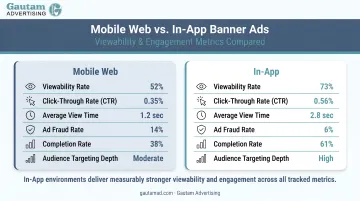
That higher in-app engagement is partly driven by the MRAID (Mobile Rich Media Ad Interface Definition) protocol, which enables advanced interactions like geolocation, accelerometer functions, and ad resizing — capabilities not available in mobile web environments.
Why Mobile Banners Persist:
Despite predictions of decline, mobile banners remain a staple of digital advertising. Three practical reasons account for their staying power:
- Easy to implement across all devices and operating systems
- Cost-effective for brand awareness at scale
- Supported by mature ad networks with strong fill rates
The IAB reports display advertising grew 9.8% year-over-year, confirming that banners aren't going anywhere.
Types and Sizes of Mobile Banner Ads
Choosing the right banner size directly affects performance. Ad networks have standardized dimensions ensuring compatibility across devices.
Standard Banner (320×50)
The 320×50 standard banner is the most common mobile ad size, accounting for the majority of mobile banner impressions globally. It sits unobtrusively at the top or bottom of app screens, making it ideal for:
- Short, punchy brand awareness messaging
- Budget-conscious campaigns (lowest CPM rates)
- Universal device compatibility
- Minimal screen real estate consumption
One drawback: limited visual space restricts copy to 5-7 words maximum, making complex messaging difficult.
Large Banner (320×100)
The 320×100 large banner (called 320×90 in some networks) offers 80% more vertical space than standard banners. This format suits:
- Animated or video banner content
- Multiple visual elements (product image + logo + CTA)
- Brand campaigns requiring stronger visual impact
- Apps with generous UI spacing
Medium Rectangle (300×250)
The 300×250 medium rectangle is considered a premium placement because it sits within scrollable content feeds rather than anchored to screen edges. It commands higher CPMs because it:
- Accommodates detailed messaging (features, offers, product imagery)
- Achieves higher viewability (users scroll past it deliberately)
- Performs well in native content environments
- Supports richer ad designs
According to IAB specifications, medium rectangles allow initial file loads up to 150 kB (versus 50 kB for standard banners)—giving designers significantly more room to work with.
Smart Banners and Adaptive Banners
Smart banners automatically detect device width and orientation, displaying 320×50 for phones and 728×90 for tablets. However, Google has replaced smart banners with adaptive banners—the modern evolution that dynamically adjusts to full screen width.
Adaptive banners use fixed aspect ratios and auto-size based on developer-specified width parameters. Benefits include:
- Increases fill rates by matching the exact device width advertisers need
- Improves performance by using all available screen space optimally
- Calculates height automatically based on each device's specifications
- Support for inline placement within scrollable content
Interstitial Ads (Full-Screen)
Interstitials are full-screen display units (320×480 for phones, up to 1024×768 for tablets) that fall outside the banner category but work alongside them. They appear at natural transition points: between game levels, during app loading, or when switching content sections.
Interstitials command significantly higher CPMs than banners but risk user frustration if poorly timed. Best used sparingly for high-impact brand messaging.
Why Mobile Banner Ads Matter for Your Business
The business case for mobile banner advertising is compelling, especially given India's position as one of the fastest-growing digital advertising markets in the world.
Global Mobile Ad Market
For scale: US internet advertising revenue reached $294.6 billion in 2025, with display advertising (including banners) contributing $81.6 billion of that total. Globally, mobile advertising exceeded $400 billion in 2024 — mobile now accounts for over 88% of total digital ad spend in mobile-first markets.
India's Mobile Advertising Opportunity
India's digital advertising market is experiencing explosive growth:
- ₹59,642 crore in 2024, projected to reach ₹73,062 crore in 2025 (22.5% growth)
- Mobile devices account for 86% of India's total digital advertising spend
- Digital advertising now represents 54% of India's total advertising market
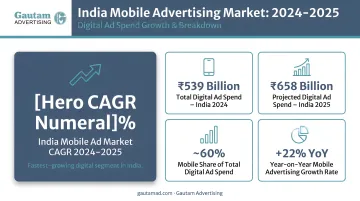
With India's 958 million active internet users and 622 million smartphone owners, mobile banner ads offer broad reach across both urban and rural markets.
Which Businesses Benefit Most
Mobile banner campaigns deliver exceptional value for specific advertiser categories:
- Real estate: Location-based targeting reaches homebuyers near properties
- Hospitality: Geo-fenced campaigns target travelers near hotels and restaurants
- Retail: Time-of-day targeting drives foot traffic during peak shopping hours
- Financial services: Demographic targeting reaches specific income segments
- Recruitment: Industry-specific app placements reach qualified candidates
For businesses running campaigns across both digital and traditional channels, working with an experienced media agency — one with established relationships across publications and digital networks — can significantly simplify targeting, scheduling, and rate negotiation.
Mobile Banner Ad Design Best Practices
Scaling down desktop creatives doesn't work — mobile screens have fundamentally different visual hierarchies, interaction patterns, and attention spans. Effective banner ads are built for mobile from the start, not adapted after the fact.
Mobile-First Design Principles:
- Build creatives specifically for mobile screens (not desktop adaptations)
- Keep layouts clean and uncluttered
- Use single, clear messages per banner
- Prioritize visual hierarchy (logo → message → CTA)
- Test on actual devices, not just desktop previews
Copy and Messaging Guidelines:
Mobile banners require ruthless brevity:
- Cap copy at 5-7 words for standard 320×50 banners
- One message per ad unit — no exceptions
- Use action-oriented CTAs: "Shop Now," "Learn More," "Get Started"
- Place the CTA on the right side, where thumb interaction is most natural
- Write descriptions in title case — it performs up to 27% better than sentence case
According to Google's performance marketing research, personalized headlines perform 1.3X better, while descriptions with offers perform 27% better than generic copy.
Visual Hierarchy and Logo Placement:
- Place brand logo prominently (top-left or top-right)
- Ensure logo remains recognizable at small sizes
- Use high-contrast color combinations (but avoid jarring neon palettes)
- Avoid busy background images that compete with messaging
- Images featuring people perform 30% better than product-only images
Animation and HTML5 Best Practices:
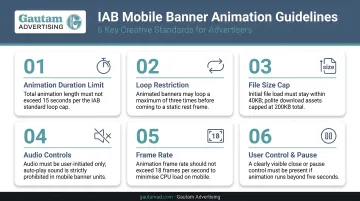
IAB guidelines establish strict animation standards:
- Maximum 15-second animation loops (no looping beyond this)
- 3-4 animation frames maximum to retain viewer attention
- No flashing or high-contrast strobing effects (listed as "Not Allowed")
- Autoplay video must be muted by default
- Maximum 50 kB initial load for standard banners (150 kB for medium rectangles)
- Shorter loops of 6-8 seconds work particularly well on mobile — and rich media elements like countdown timers, live pricing, and location-based offers give users a reason to engage
Overcoming Banner Blindness:
Banner blindness—users' tendency to unconsciously ignore banner ads—is a documented phenomenon. Nielsen Norman Group research found the right rail occupied 25% of content area but received only 0.8% of user attention.
Counter banner blindness with:
- Fresh creative rotation: Update banners every 7-14 days to prevent familiarity
- Dynamic content: Use real-time data (inventory updates, pricing changes, weather-triggered messaging)
- Personalization: Use audience data to serve demographic-specific creative — Google reports first-party data targeting delivers a 55% improvement over standard targeting
- A/B testing: Test visual treatments, CTAs, color schemes, and value propositions
- Strategic placement: In-content placements outperform anchored positions
Beyond personalization, optimized targeting overall delivers an average 25% improvement in campaign objectives — making audience strategy just as critical as creative execution.
How to Plan and Buy Mobile Banner Ad Space
Media buying for mobile banners comes down to one foundational choice: programmatic automation or direct publisher relationships. Each suits different campaign goals, budgets, and targeting needs.
Programmatic vs. Direct Buying:
| Method | Best For | Advantages | Considerations |
|---|---|---|---|
| Programmatic | Precise audience targeting at scale | Real-time bidding, demographic/behavioral targeting, cost efficiency | Requires DSP expertise, potential brand safety concerns |
| Direct Buying | Premium, brand-safe placements | Guaranteed inventory, direct publisher relationships, custom placements | Higher minimum spends, less targeting flexibility |
Programmatic advertising reached $134.8 billion globally in 2024, growing 18% year-over-year, indicating most display inventory now transacts programmatically.
Mobile-Specific Targeting Advantages:
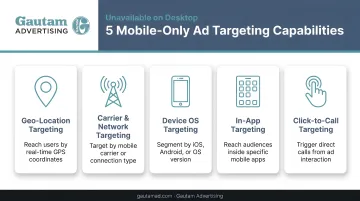
Mobile devices enable targeting impossible on desktop:
- Geo-location targeting: Reach users within specific radius of physical locations (stores, events, properties)
- Device-type and OS targeting: Differentiate campaigns for iOS vs. Android users
- Time-of-day targeting: Show ads when conversion likelihood is highest (lunch hours for restaurants, evenings for e-commerce)
- Carrier targeting: Focus on users with specific mobile carriers
- App category targeting: Place ads in finance apps, gaming apps, news apps, etc.
According to the IAB's Location-based Marketing Playbook, 81% of smartphone users keep phones near them "almost all the time." One geofenced campaign showed 8.5% of notification recipients visiting physical stores — a direct conversion from mobile impression to foot traffic.
Working with Advertising Agencies:
For many businesses, particularly SMEs and mid-sized corporates, partnering with an experienced agency simplifies mobile banner campaign planning:
- Secure better CPMs through established publisher relationships and volume buying
- Coordinate campaigns across multiple platforms and publications on a single schedule
- Apply demographic and behavioral targeting expertise without building it in-house
- Access consolidated performance reporting across all channels in one view
For Indian advertisers in particular, working with an INS-accredited agency like Gautam Advertising means access to negotiated rates across 10,000+ publications and digital platforms — backed by publisher relationships built over 55+ years. INS accreditation also provides an added layer of accountability that unaccredited intermediaries cannot offer.
Frequently Asked Questions
What is a mobile banner ad?
A mobile banner ad is a rectangular static or animated display unit shown within mobile apps or mobile websites, typically anchored at the top or bottom of the screen or embedded within scrollable content. It's used primarily for brand awareness and driving clicks to landing pages.
What are the different types of banner ads?
The main types are: standard banner (320×50), large banner (320×100), medium rectangle (300×250), smart/adaptive banners that auto-resize for device width, and full-screen interstitials. Standard banners offer the widest reach; medium rectangles command premium pricing due to higher engagement.
Is 300×250 a mobile ad size?
Yes, 300×250 is a widely used mobile banner size known as the medium rectangle. It's commonly placed within scrollable in-app content feeds, offering more visual space for messaging than standard banners, which translates to higher engagement and CPM rates.
What is the standard mobile banner ad size?
320×50 is the industry-standard mobile banner size, representing the most commonly used format across both apps and mobile web. Its popularity stems from non-intrusive footprint, lowest cost per thousand impressions (CPM), and universal compatibility across all devices and operating systems.
How much do banner ads make on apps?
Revenue varies widely based on geography (CPMs differ significantly by market), app category (finance and e-commerce outperform casual gaming), ad placement quality, and mediation strategy. Publishers running multiple ad networks in competition typically achieve notably higher effective CPMs than single-network setups.
Are mobile banner ads still effective in 2025?
Yes, mobile banner ads remain highly effective for brand awareness when paired with strong creative, proper audience targeting, and regular refresh to combat banner blindness. They're one of the highest-volume ad formats globally, generating over $81 billion in display revenue in 2025.